Network with IOT devices
1.Here I am
going to tell you about IOT(internet of things). How do they work? How to
connect these devices to each other or control by remote location.
2. Here we
are taking one server, one switch and few IOTs. Straight through cable is
required to connect all of these with Fast ethernet ports.

3. Now we
assign IPs to each device, make sure all IPs should be in same network because
it is connected by single switch, not with any layer 3 device such as router.
IOT IP can be assign on config Tab FastEthernet interface. Port should be in on
status as given in below picture.
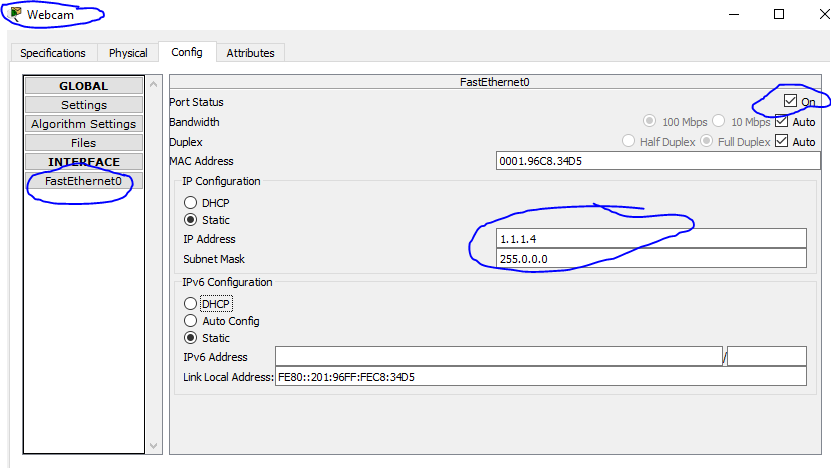
4. In
server IoT services should be enabled as in below snipped.

5. For next
step we click on server and go to Desktop Tab. Click on IOT monitor application.

6. When we
click on IoT Monitor app. It will ask you for login. So we put server IP and
username and password as per your choice. Username and Password can be
incorrect, so you need to sign up now.
After that
you need to login in each IoT device with server credentials.

7. Now we
can monitor from server with the help of IoT monitor application. We can on off
and fast Fan. Lamp can be turn on and turn off. Same as for webcam.

IF you have
any query feel free to reach me. Kindly comment on below comment box for any
concern.
|
|---|

Welcome to this blog, a dedicated resource for networking professionals seeking to enhance their practical skills. Here, we focus on collaboration, knowledge-sharing, and problem-solving to stay ahead in the fast-evolving networking landscape. Engage with insightful discussions, ask precise questions, and contribute your expertise. Join us in building a knowledgeable community where every voice contributes to collective growth.
-
 How to create web server on packet tracer 1. In this lesson we will learn about how to create first web page on cisco packet tracer tha...
 -
 Configuration of mail server on cisco packet tracer 1. In this tutorial we will learn how to set mail server on cisco packet trac...
 -
 How to set IOT(AC and Solar panel) on cisco packet tracer 1. In this lesson we will learn about adding IOT devices cisco packet tr...